Understanding the SQL Injection Payload: A Deep-Dive Security Analysis
1. Introduction
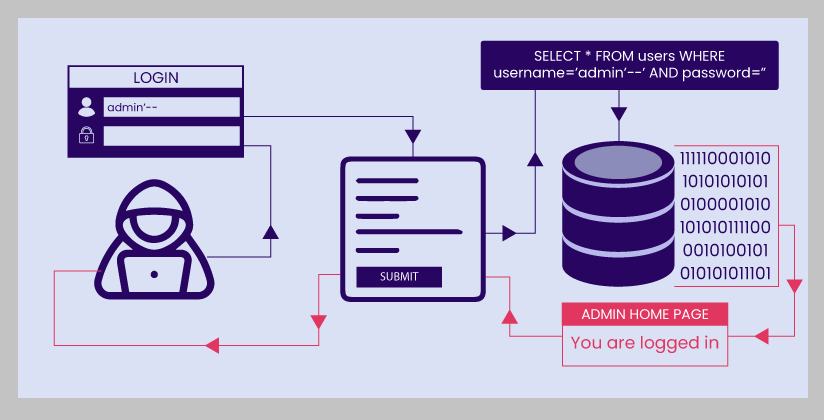
SQL injection (SQLi) is a security vulnerability that occurs when an application incorporates untrusted user input into a SQL query without properly separating data from executable SQL instructions. Depending on the application and database permissions, a successful SQL injection attack can allow an attacker to bypass authentication, retrieve unauthorized information, modify database records, or interfere with application functionality.
A suspicious input such as:
-1' OR 5*5=25 or 'xI
may represent an attempt to test an application's resistance to SQL injection. It contains several recognizable elements: a negative numeric value, a single quote, a Boolean operator, an arithmetic comparison that evaluates to true, and an additional quoted string.
Although the input is short, analyzing its components illustrates how attackers probe the boundaries between user-supplied data and executable SQL.
Important distinction: The presence of a SQL injection payload does not prove that an attack succeeded. Its actual effect depends on the application's original SQL query, the database engine, the way the input is incorporated into that query, and any security controls in place.
2. What Is SQL Injection?
SQL injection is a class of injection vulnerability that arises when an application constructs SQL statements using untrusted input in a way that allows the input to change the statement's intended structure.
Applications commonly interact with relational databases to authenticate users, retrieve account information, search records, process transactions, and manage administrative functions.
For example, an application might construct a query using string concatenation:
$sql = "SELECT * FROM users WHERE username = '" . $username . "'";
This implementation is unsafe if $username is not handled appropriately. User input becomes part of the SQL statement itself, potentially allowing specially crafted input to alter the query's logic.
The fundamental issue is not that SQL contains characters such as quotes or Boolean operators. Those characters are legitimate parts of the SQL language. The issue is whether the application allows user-controlled data to be interpreted as SQL instructions.
Modern applications should use parameterized queries, also known as prepared statements, to keep data separate from executable SQL.
3. Analyzing the Payload
Consider the complete input:
-1' OR 5*5=25 or 'xI
It can be divided into several components for analysis.
3.1 The negative value: -1
The payload begins with a negative integer.
Negative values can appear in legitimate application inputs, but they are also sometimes used in injection probes.
Depending on the target query, -1 might be intended to:
• Test whether an application accepts unexpected numeric values.
• Interact with a numeric identifier or comparison.
• Produce a result that differs from ordinary positive identifiers.
• Serve as a prefix before an attempt to alter the surrounding SQL expression.
The value alone is not evidence of malicious activity. Its significance depends on the field receiving it and the SQL statement that uses it.
3.2 The single quote: '
The single quote is an important feature of this payload.
In SQL, single quotes commonly delimit string literals. For example:
SELECT * FROM users WHERE username = 'alice';
Here, 'alice' is a string literal.
If an application inserts user input directly into a quoted string, an unexpected quote may terminate the string earlier than intended. Subsequent characters may then be interpreted as SQL syntax.
However, a quote does not automatically create a vulnerability. In a correctly parameterized query, a quote supplied as data remains data rather than changing the query's structure.
Whether this particular quote closes an existing string depends on the original SQL statement.
3.3 The Boolean operator: OR
The keyword OR is a standard SQL logical operator.
It combines two conditions. The overall expression evaluates to true if at least one condition evaluates to true.
For example:
SELECT * FROM products
WHERE price < 10 OR category = 'books';
This query selects products that satisfy either condition.
In an injection attempt, an attacker may try to introduce an additional OR condition into an existing WHERE clause. If the resulting expression is valid and changes the intended logic, the application may return records it was not supposed to return.
The presence of OR in a user input is not sufficient to establish SQL injection. Search applications, educational tools, and other legitimate systems may also receive such text.
3.4 The arithmetic expression: 5*5=25
The expression:
5*5=25
compares the result of a multiplication operation with the number 25.
Because 5×5=255 \times 5 = 25, the comparison is true under ordinary SQL numeric evaluation.
This makes it a useful example of a constant Boolean condition.
An attacker testing for SQL injection may use a condition whose result is predictable. If the application incorporates that condition into executable SQL, the resulting query may behave differently from the intended query.
For example, consider the simplified expression:
WHERE account_id = 123 AND 5*5=25
The additional condition is true, so it does not restrict the matching records further.
However, the actual payload contains a quote and additional text. The expression 5*5=25 cannot be evaluated in isolation to determine whether the complete payload changes a real application's behavior.
3.5 The trailing text: or 'xI
The final portion is:
or 'xI
It contains another logical operator and the beginning of a quoted string.
Its role is ambiguous without knowing the surrounding query.
Possible explanations include:
• An attempt to balance or interact with quotation marks in the original SQL statement.
• An incomplete or malformed injection payload.
• A probe generated by an automated scanner.
• A manually constructed test string.
The final characters do not, by themselves, establish a specific attack technique or objective.
For example, if the input is inserted into a numeric expression, its behavior may differ substantially from its behavior inside a quoted string. Depending on the surrounding syntax, the resulting SQL might be invalid and produce a database error rather than execute as intended.
The string should therefore be analyzed as a complete input within its application context, not as a standalone SQL command.
4. How the Payload Might Interact With an Application
The same input can have different effects depending on how the application handles it.
Scenario A: Unsafe string concatenation
Imagine an application that builds a query like this:
$sql = "SELECT * FROM users WHERE username = '" . $input . "'";
If the input is inserted directly into the SQL statement, an unexpected quote may change the statement's syntax.
The resulting query might become invalid, or it might change the intended logic if the syntax happens to remain valid.
The important security problem is that the application allows user input to influence the structure of the SQL statement.
The exact result cannot be determined from the payload alone because it depends on the complete query and its surrounding syntax.
Scenario B: Numeric input incorporated into SQL
Consider another application:
$sql = "SELECT * FROM products WHERE product_id = " . $input;
This code also uses unsafe string concatenation.
Because the input is inserted without quotation marks, a payload containing a single quote and Boolean operators may produce a syntax error or alter the expression, depending on the resulting statement.
The application should not assume that a field is safe merely because it is intended to contain a number. Input validation helps enforce the expected format, but parameterization is the primary defense against SQL injection.
Scenario C: Parameterized queries
A safer approach is to bind the input as a parameter.
For example, with PHP Data Objects (PDO):
$stmt = $pdo->prepare(
"SELECT * FROM users WHERE username = :username"
);
$stmt->execute([
'username' => $input
]);
In this implementation, the supplied string is treated as a parameter value rather than being inserted directly into the SQL statement.
The quote, OR keyword, arithmetic expression, and trailing characters therefore do not become additional SQL instructions through ordinary parameter binding.
For numeric identifiers, the application should also validate that the supplied value has the expected type and falls within acceptable limits.
5. What Might the Attacker Have Been Trying to Achieve?
The payload is consistent with several possible motivations. The available evidence does not establish which one applies.
5.1 Testing for SQL injection
An individual or automated scanner may submit unusual strings to determine whether an endpoint is vulnerable.
The tester may observe differences in:
• HTTP status codes.
• Application response content.
• Database error messages.
• Response times.
• The number of records returned.
A changed response may justify further investigation, but it is not conclusive proof of SQL injection.
5.2 Attempting to change query logic
The constant expression 5*5=25 is true. If an attacker can insert it into an executable SQL condition, it may alter how that condition evaluates.
The presence of OR suggests a possible attempt to introduce an alternative condition into an existing expression.
Whether the attempt could bypass a restriction depends on the query's structure. SQL operator precedence, quotation marks, parentheses, and comments can all affect the result.
5.3 Probing authentication or authorization controls
SQL injection is sometimes used to test whether an application improperly relies on user-controlled query conditions when authenticating users or retrieving protected records.
However, this payload does not specifically identify a login bypass attempt. It could have been submitted to a search field, an identifier parameter, a product page, or another input entirely.
The endpoint and its application behavior are necessary to draw a more specific conclusion.
5.4 Automated vulnerability scanning
Automated security scanners frequently submit unusual combinations of quotes, logical operators, arithmetic expressions, and other SQL-related syntax.
A payload like this could have been generated automatically.
Nevertheless, the string alone cannot identify a particular scanner, tool, person, or source.
6. Could This Payload Bypass a Login?
Possibly, but there is not enough information to conclude that this particular input would bypass authentication.
A login bypass depends on the original authentication query, the placement of the input, the database's interpretation of the resulting statement, and the application's subsequent authentication logic.
A typical application might use a query that checks a username and a password hash. In a secure design, credentials are verified using parameterized queries and appropriate password-hashing functions.
Even if a database query returns an unexpected record, the application should not rely on that result alone to grant access without the proper authentication and authorization checks.
Consequently, the payload should be treated as a possible injection probe, not proof that an account was accessed.
7. How to Investigate the Request
If this string appeared in your website or application logs, investigate it systematically.
Step 1: Identify the affected endpoint
Determine where the input was submitted:
• A login form.
• A search field.
• A URL parameter.
• An API request.
• An administrative interface.
• A database-backed reporting feature.
The endpoint helps establish which query might have received the value.
Step 2: Review the surrounding request
Record the relevant information, subject to your organization's privacy and logging policies:
• Timestamp.
• HTTP method and requested endpoint.
• Parameter name containing the payload.
• HTTP response status.
• Whether the application logged a database exception.
• Whether similar requests occurred before or afterward.
Avoid relying on the payload alone. A sequence of related requests may provide a clearer picture of whether the activity was automated or targeted.
Step 3: Examine application and database errors
SQL syntax errors may indicate that unusual input reached a database query, but they do not independently prove exploitability.
Review application logs for unexpected database exceptions, and investigate whether the application exposed internal SQL statements or database details to the requester.
Production applications should generally return generic error messages to users while recording appropriately detailed diagnostic information in protected server-side logs.
Step 4: Check for evidence of impact
Depending on the endpoint and available telemetry, examine whether the request was associated with:
• Unexpected database query results.
• Authentication failures or unusual successful logins.
• Access to records outside the user's permissions.
• Unusual database errors.
• Changes to records that cannot be explained by legitimate activity.
• Subsequent suspicious requests.
A logged payload alone is not evidence that any data was accessed or modified.
Step 5: Reproduce the issue safely
If you own or are authorized to assess the application, reproduce the behavior in a controlled test environment.
Use a staging database with synthetic records, inspect the application's query construction, and verify that parameters are bound correctly.
Avoid experimenting against production accounts or sensitive records when a safe test environment is available.
8. Recommended Defenses
A robust defense against SQL injection uses multiple complementary controls.
8.1 Use prepared statements
Prepared statements are the primary defense for ordinary database queries involving user input.
For example:
cursor.execute(
"SELECT * FROM users WHERE username = %s",
(username,)
)
This example uses parameter binding in a Python database driver that supports %s placeholders. Placeholder syntax varies by database driver, so the correct syntax should be taken from the driver's documentation.
Do not substitute manual string escaping for parameterization when a parameterized query is available.
8.2 Validate input according to its purpose
Validation should reflect the application's business rules.
Examples include:
• User IDs must be valid integers.
• Dates must use an accepted date format.
• Search terms must meet reasonable length limits.
• Enumerated fields must match permitted values.
Validation can reject inappropriate values early, but it is not a substitute for parameterized SQL.
8.3 Apply least-privilege database permissions
The application's database account should have only the permissions it needs.
A public-facing service that only reads product information generally should not have unrestricted permission to modify user accounts or administer the database.
Restricting privileges can reduce the potential damage from a successful injection vulnerability.
8.4 Avoid exposing database errors
Detailed database errors can reveal information about query structure, table names, database versions, or application implementation.
Return generic errors to clients and keep detailed diagnostics in protected logs.
8.5 Monitor suspicious input
Security monitoring can flag unusual combinations of SQL keywords, quotation marks, and Boolean expressions.
However, such detections can generate false positives. Legitimate users may enter SQL examples, source code, or ordinary text containing similar characters.
Use these alerts as indicators for investigation rather than treating every match as a confirmed attack.
8.6 Use a web application firewall as an additional layer
A web application firewall (WAF) may identify or block some SQL injection attempts before they reach the application.
A WAF should complement secure query construction rather than replace it. Attackers may evade pattern-based filters, and overly broad rules may block legitimate traffic.
9. Common Misconceptions
Several misunderstandings can lead to incorrect conclusions about this payload.
Misconception 1: Any single quote proves SQL injection.
A quote is a normal character in many inputs. A vulnerability exists when the application's handling of that input allows SQL structure to be altered.
Misconception 2: A true Boolean expression guarantees a successful attack.
The expression 5*5=25 is true, but the complete statement may be invalid, may not reach a database, or may be handled safely as a parameter.
Misconception 3: A database error means the attacker gained access.
An error may simply indicate that the database rejected malformed SQL. Exploitation requires separate evidence.
Misconception 4: A WAF makes parameterized queries unnecessary.
A WAF can help detect and block suspicious traffic, but application-level parameterization remains essential.
Misconception 5: The payload identifies the attacker.
The string does not establish the attacker's identity, location, intent, or tool. Attribution requires independent evidence.
10. Security Assessment of This Specific String
The payload contains several recognizable features associated with SQL injection testing:
Component Potential significance What can be concluded
-1 Unexpected numeric input May test numeric handling
' Possible string-boundary manipulation May interact with an existing SQL string
OR Logical alternative May attempt to change a Boolean condition
5*5=25 Constant true expression Evaluates to true under ordinary SQL numeric evaluation
or 'xI Additional logical operator and quoted text Purpose is ambiguous without query context
The strongest justified conclusion is that the string is consistent with a SQL injection probe or attempted injection payload.
It is not possible to determine from the string alone whether it would execute successfully, what information it might expose, whether it was generated by a scanner, or whether the sender intended to bypass authentication.
11. Conclusion
The payload -1' OR 5*5=25 or 'xI illustrates how seemingly ordinary characters can become security-relevant when an application mixes user input with SQL instructions.
The negative number may test numeric handling. The single quote may attempt to interact with a string boundary. The OR operator and constant true expression may be intended to change the logic of an existing SQL condition. The trailing text adds uncertainty because its effect depends on the original statement.
For defenders, the most important task is not to guess the attacker's intent from a short string. It is to establish where the input was received, determine how the application used it, and verify that untrusted input cannot alter SQL query structure.
Parameterized queries, appropriate validation, least-privilege database accounts, protected logging, and controlled security testing provide a strong foundation for preventing and investigating SQL injection.
Ultimately, a suspicious payload is evidence of an unusual input, not proof of a successful compromise. A reliable assessment requires application context, query behavior, and corroborating security evidence.
 111307