NewStori...First & Foremost A Quality News Outlet!
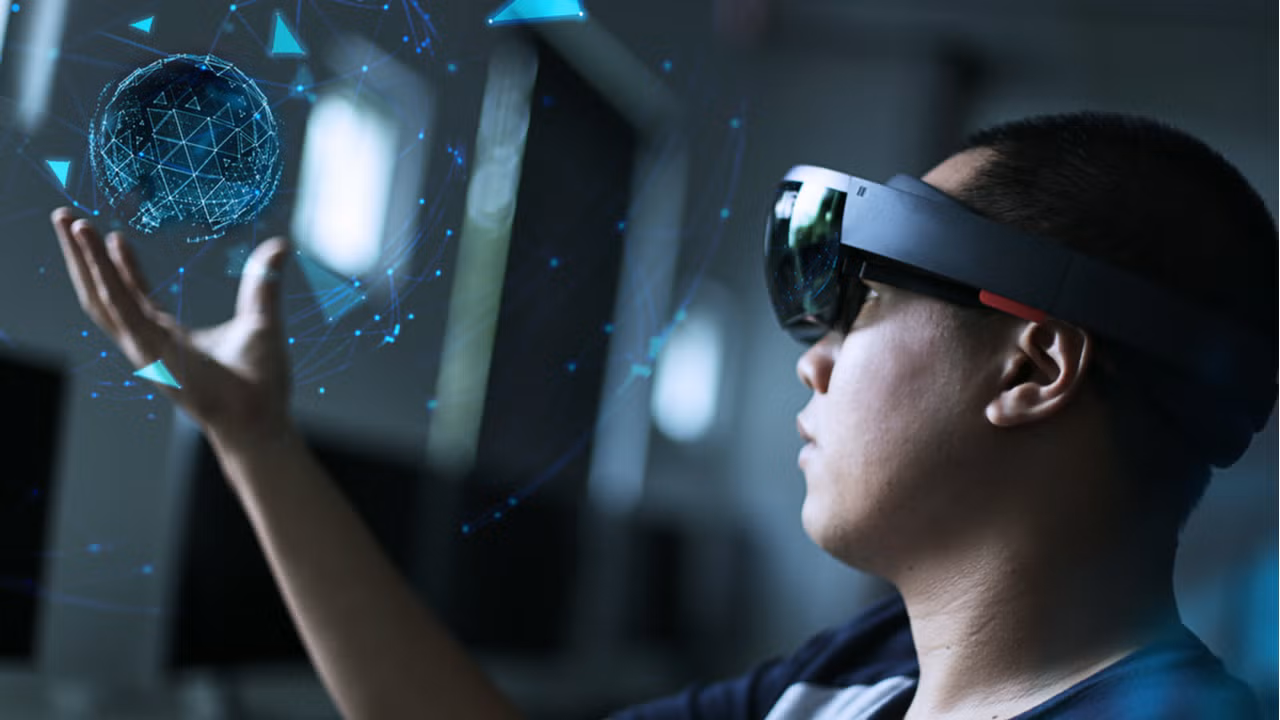
Augmented Reality (AR) has rapidly evolved from a niche technology into a transformative force across industries. Once most visible in consumer apps and gaming, AR is now reshaping enterprise workflows, healthcare, education, retail, and everyday life. As hardware becomes more powerful and developer tools more accessible, we’re entering a phase where AR experiences are more immersive, contextual, and intelligent than ever. Here’s a deep dive into the most compelling trends in AR shaping the next decade.
1. Spatial Computing Comes Into Focus
AR is shifting from screen-bound overlays to spatial computing—where digital visuals are anchored to the physical world in ways that feel natural and intuitive. Future AR headsets and glasses will let users:
• Interact with floating interfaces without controllers
• Manipulate digital objects using natural gestures
• Seamlessly blend physical and virtual workspaces
This shift will accelerate the movement from smartphones as the primary AR vehicle to lightweight, wearable AR devices.
2. AI-Driven AR Experiences
Artificial Intelligence (AI) and AR are converging to create smarter, context-aware experiences. AI enables AR systems to:
• Understand environments in real time
• Recognize objects and surfaces with precision
• Generate adaptive content based on user intent
For example, AI-enhanced AR could translate signage instantly, provide real-time industry workflows on complex machinery, or generate tutorials tailored to a user’s actions—all without manual input.
3. Persistent, Shared AR Content
One of the biggest trends is persistent AR—digital content that stays anchored to specific real-world locations and is accessible across sessions and users. This could enable:
• Community-generated annotations in public spaces
• Multiuser AR games tied to real physical environments
• Location-based storytelling and interactive tours
Persistent AR bridges the gap between individual experiences and shared digital environments.
4. AR in Everyday Workflows
AR is rapidly transitioning from entertainment into productivity and enterprise applications:
• Remote assistance: Technicians can receive real-time guidance overlaid on machinery.
• Training and simulation: Workers practice complex tasks in safe, controlled AR environments.
• Design and prototyping: AR enables virtual mockups of products and spaces before physical builds.
Businesses are discovering AR not just as a novelty, but a tool to increase efficiency, reduce errors, and accelerate learning curves.
5. AR in Retail and e-Commerce
Consumers increasingly blend digital and physical shopping. AR is helping brands:
• Offer virtual try-ons for fashion, makeup, and eyewear
• Visualize furniture in a home before purchase
• Provide interactive product demos in real time
These experiences don’t just delight customers—they improve conversion and reduce return rates.
6. Mixed Reality and Digital Twins
Mixed Reality (MR) and digital twins are becoming strategic tools. A digital twin is a precise AR/VR representation of a real physical object or environment. Use cases include:
• Real-time building monitoring (e.g., for safety or energy optimization)
• Factory floor simulations
• Urban planning and infrastructure maintenance
These techniques allow organizations to test scenarios virtually before acting in the physical world.
7. AR for Social Interaction and Collaboration
Social AR—where users connect, play, and work together in shared AR spaces—is gaining traction. Features include:
• AR avatars overlaid into shared meeting spaces
• Collaborative whiteboards in 3D
• Multiuser experiences in public AR
This democratizes digital interaction, making remote collaboration feel more like being physically present.
8. AR in Navigation and Environmental Awareness
AR navigation will surpass maps and GPS strings on a screen. Future AR systems will:
• Overlay directions directly into a user’s field of view
• Highlight points of interest with contextual information
• Assist visually impaired users with environmental cues
This spatially aware navigation enhances safety and convenience.
9. Privacy and Ethical Design
As AR sensors map real environments, ethical use and privacy safeguards are critical. Emerging frameworks emphasize:
• User control over what’s captured and shared
• Secure handling of environmental data
• Transparent consent for AR interactions
Trust is foundational for widespread AR adoption—especially in public and sensitive spaces.
10. Affordable Hardware and Cross-Platform Development
AR is moving beyond single-platform exclusivity. Open standards and cross-platform toolkits (like WebXR and Unity/Unreal development kits) empower creators to build once and deploy widely. Meanwhile, hardware costs are dropping with mobile-first and lightweight wearables driving accessibility.
The Future Is Augmented
Augmented Reality is no longer a speculative technology—it’s an expanding ecosystem driving practical innovation. From smart glasses to AI-optimized workflows, AR is poised to redefine how we see, interact with, and enhance the world around us. The key to its success will be seamless integration into daily life, ethical use, and a continued push toward natural, intuitive experiences.
Whether you’re a developer, business leader, or curious technology enthusiast, understanding these AR trends offers a glimpse into the next wave of digital transformation.
Peripherals—the devices that connect to and extend the functionality of computers and networks—have been essential to the way humans interact with digital technology. From early keyboards and floppy disks to modern touchscreens, voice assistants, and AI-enabled devices, peripherals shape not only how we input and receive data, but also how we experience and communicate with technology. These tools have evolved dramatically, becoming more sophisticated and accessible over time, and have played a major role in productivity, entertainment, accessibility, and human-computer interaction.
What Are Peripherals and Why They Matter
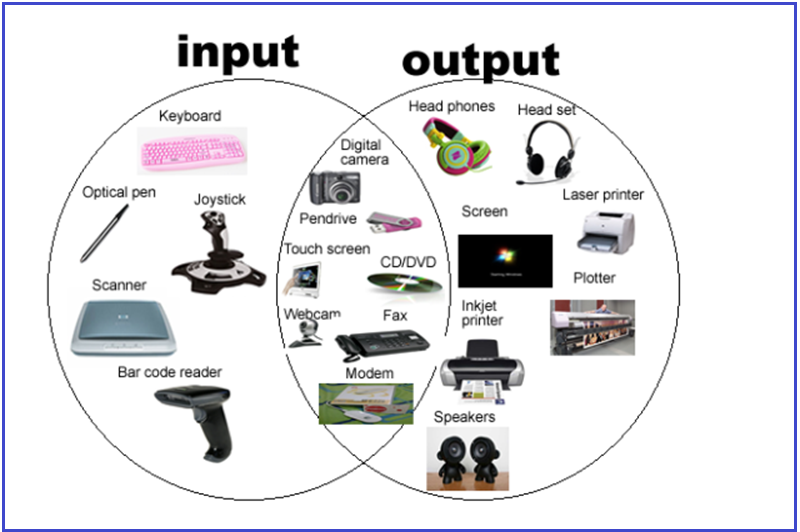
In computing, peripherals are external devices connected to a computer or network that allow input, output, or additional functionality. Without peripherals, computers would be isolated machines with limited usability. Keyboards, mice, displays, storage drives, printers, speakers, webcams, and network cards are all examples.
Peripherals are important because they:
• Enable user input (keyboard, mouse, scanners)
• Provide output (monitors, speakers, printers)
• Expand storage and connectivity (external drives, network adapters)
• Improve specialized functions (graphics tablets, VR headsets)
• Increase accessibility for people with disabilities
The evolution of these devices reflects both technological progress and the changing ways people use computers—from work and education to entertainment and communication.
The Evolution of Key Peripherals
1. Keyboard: From Typewriter Roots to Smart Keyboards
Past: Early keyboards were directly inspired by mechanical typewriters and used large, heavy switches. They connected to computers via large connectors and provided only basic text input.
Present: Keyboards today range from membrane and mechanical switches to wireless and ergonomic designs. They often include multimedia keys, backlighting, USB hubs, and software customization.
Advantages:
• Proven input method for text and commands
• Ergonomic designs reduce strain and injury risk
• Customization supports gaming, productivity, and accessibility
Disadvantages:
• Can strain wrists and hands if poorly designed
• Traditional layouts aren’t ideal for every language or ability
AI Impact: AI-assisted typing features like predictive text, gesture typing, and voice-to-text reduce the effort required for input and make keyboards more intelligent and adaptive.
2. Mouse: From Ball to Optical and Beyond
Past: The first commercial mouse in the 1960s used rolling balls to track movement. Surface dirt frequently affected performance.
Present: Modern mice use optical and laser sensors with high precision. Wireless connectivity, programmable buttons, ergonomic shapes, and adjustable sensitivity are common.
Advantages:
• Precise control for pointing and selecting
• Essential for graphic design, gaming, and detailed tasks
• Ergonomic shapes reduce wrist strain
Disadvantages:
• Not ideal for users with limited dexterity
• Requires desk space and surfaces
AI Impact: AI-powered gesture recognition, adaptive sensitivity, and predictive cursor movement have made mice more intuitive and accurate.
3. Speakers and Audio Output
Past: Early computers produced simple beeps and tones. Dedicated speakers were bulky, low fidelity, and limited in range.
Present: Speakers now range from compact USB and Bluetooth models to high-fidelity surround sound systems. Audio peripherals integrate software enhancements (equalization, 3D audio) and AI-driven features like noise cancellation and voice enhancement.
Advantages:
• Dramatic improvements in sound quality
• Wireless options deliver portability
• Integration with virtual assistants enhances usability
Disadvantages:
• Wireless speakers can suffer from latency or connectivity issues
• High-quality systems can be expensive
AI Impact: AI improves sound tuning, adaptive volume control based on content, and personalized listening profiles.
4. Storage Devices: From Floppy Disks to Solid State Drives
Past: Early storage peripherals like floppy disks held only a few hundred kilobytes. Hard drives were slow and limited in capacity.
Present: USB flash drives, external SSDs, and network attached storage (NAS) now offer terabytes of space with fast read/write speeds. Cloud storage also functions as a virtual peripheral, extending capacity beyond the physical device.
Advantages:
• Massive capacity increases productivity and data retention
• SSDs deliver high performance with no moving parts
• Portable and networked options are widely available
Disadvantages:
• More expensive per gigabyte than older storage types
• Data security and privacy concerns with cloud storage
AI Impact: AI helps optimize storage usage, predict failure before it occurs, and accelerate data retrieval through intelligent caching.
Peripherals and Accessibility: Empowering Users with Disabilities
A transformative impact of peripherals has been improved accessibility for users with disabilities. While early computing did not consider inclusive design, many modern peripherals are specifically created or adapted to support users with diverse needs.
Examples of Accessibility-Focused Peripherals:
• Adaptive Keyboards:
Larger keys, customizable layouts, and touch-sensitive surfaces enable individuals with motor impairments to type more easily.
• Eye-Tracking Devices:
Enable users to control cursors and type using eye movement, benefiting those with limited limb mobility.
• Switch Controls and Sip-and-Puff Devices:
Allow users to send input through simple switches or breath control, useful for individuals with severe mobility limitations.
• Alternative Mice (Trackballs, Joysticks):
Provide different physical forms of control for people who find traditional mice difficult to use.
• Speech Recognition and Voice Assistants:
Voice-to-text and voice commands eliminate the need for traditional input in many tasks.
Impact on Lives:
These peripherals dramatically expand opportunities for communication, employment, education, and independence. For example:
• Students with physical disabilities can complete assignments and participate in online learning.
• Professionals can use adaptive devices to work with the same software tools as colleagues.
• Daily tasks such as texting, emailing, and navigating interfaces become feasible for a wider range of users.
AI and Accessibility:
Artificial intelligence has accelerated accessibility innovations:
• AI-driven speech recognition is now more accurate and context-aware.
• Predictive text and word suggestions speed up communication.
• AI interprets user behavior and adapts interfaces in real time, learning individual preferences and limitations for personalized interaction.
Advantages and Disadvantages of Peripheral Evolution
As peripherals evolve, the benefits and challenges they bring become important to evaluate:
Advantages
1. Enhanced Interaction:
Peripherals provide intuitive ways for users to interact with computers—touch screens, voice input, gesture controls—making technology more natural and responsive.
2. Increased Productivity:
Faster storage, better input devices, and advanced displays help complete tasks more quickly.
3. Customization and Specialization:
Devices like gaming controllers or graphic tablets allow tailored experiences for specific tasks.
4. Greater Accessibility:
Adaptive peripherals empower users of all abilities.
5. Mobility and Wireless Freedom:
Bluetooth keyboards, wireless mice, and portable storage free users from cables.
Disadvantages
1. Cost:
High-end peripherals can be expensive, creating barriers for some users.
2. Compatibility Issues:
New devices may not work with older systems or require drivers and software updates.
3. Learning Curve:
Complex peripherals (e.g., VR controllers) can require time and training to use effectively.
4. Dependence on Software:
Many modern peripherals require bundled software or AI services that may raise privacy or subscription concerns.
AI’s Role in Peripherals Past and Present
Artificial intelligence has both direct and indirect effects on peripheral evolution.
AI in Input and Interaction
• Voice Assistants: AI-powered systems process natural language—eliminating the need for traditional keyboards in many scenarios.
• Gesture Recognition: AI interprets movements captured by cameras or sensors, enabling touchless control.
• Predictive Input: Typing assistants learn user patterns to suggest words or corrections.
AI in Output and Feedback
• Adaptive Audio and Visuals: AI adjusts sound profiles and display settings based on content and environment.
• Context-Aware Interfaces: Systems adapt menus and commands based on user behavior.
Smart Peripheral Devices
Many modern peripherals are now ‘smart’—embedding AI capabilities:
• Smart webcams adjust focus and framing.
• Intelligent keyboards and mice adapt settings automatically.
• Accessibility devices use AI to translate gestures into commands.
AI has made peripherals not just tools, but extensions of cognitive and sensory capability.
Looking Ahead: What’s Next for Peripherals
As we move into the future, peripherals are likely to become even more advanced, intelligent, and integrated into human experience. Key trends include:
1. Brain-Computer Interfaces (BCIs)
BCIs aim to translate neural signals into computer commands—a major leap beyond physical input. While still emerging, early research shows promise for use in communication, gaming, and accessibility.
2. Augmented Reality (AR) and Virtual Reality (VR)
Peripherals such as haptic gloves, motion trackers, and immersive displays will redefine interaction by integrating digital content with physical movement.
3. AI-Augmented Sensing
Sensors embedded in everyday peripherals (chairs, desks, eyewear) could track posture, biometrics, and environment, using AI to improve comfort and performance.
4. Fully Voice-Driven Computing
As natural language processing improves, many tasks may be carried out entirely through voice with minimal traditional inputs.
5. Personalized, Adaptive Hardware
Future peripherals may change shape, layout, or responsiveness based on user needs, using AI to continually learn and adapt.
Conclusion
From bulky ball mice and low-capacity storage to intelligent, adaptive devices that respond to voice, gaze, and intent, peripherals have transformed the computing experience. They have made machines more capable, accessible, and expressive—bridging the gap between human intention and digital response.
Evolution in peripheral technology has not only improved productivity and entertainment but also expanded inclusion for people with disabilities, giving many individuals tools to communicate and interact with the world in meaningful ways.
Looking ahead, AI promises to continue revolutionizing peripherals, enabling systems that are contextually aware, adaptive to human needs, and increasingly seamless in how they connect us to digital experiences.
Peripherals are no longer just accessories—they are essential enablers of human-computer interaction, shaping the present and future of technology.